A big part of how PPA functions is working with the crop inputs. The app divides them into several common categories.
Let's talk about the categories that the Profit per Acre web app uses to organize the inputs. Listed below are the individual categories with a brief description.
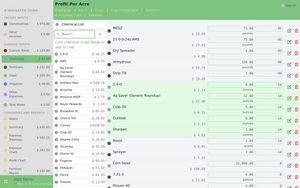
Each of the specific pages functions in much the same way. They have a list of the items, and show the price. The chemical and fertilizer lists show the purchased price. When you get an updated list of prices from your supplier, you can just run down the list of items in profit per acre and update the price.
To update the price, just click or tap within the box that surrounds the price and you can then easily edit the data.
- Custom RatesThis category is used for farming expenses. You have several choices on how you want to list the prices. One option is just to use custom rates for your county or state. Another option is for you to calculate the repairs, depreciation, etc. of your equipment and use that for all the calculations in the app.
- ChemicalsThe herbicides, insecticides, fungicides, and pesticides that you use on your farm. The prices are listed in the units that are used when purchasing the product. For example, if you purchase Chemical A in gallons but apply it in ounces, the price is listed in gallons.
- Fertilizers
The fertilizers that you use on your farm.
Profit per Acre by default uses the standard Nitrogen, Phosphorus, and Potassium for all places where analysis is displayed. More nutrients can be added. If you need some added to your data, contact support and the nutrients will be updated.
- SeedsThe different seed types you use on your farm. This probably doesn't need to be each specific variety, however, let's say your planting traited corn seed as well as non-gmo corn, you'll probably want to have two entries for corn seed because of the cost difference.
- IrrigationThe irrigation costs that you use on your farm. You can either just put in a lump sum of what you figure it costs for you to irrigate per acre, or you can do it per irrigation pass. Flexibility for the win!
- Other ExpenseThis is for the items that don't seem to slot nicely into the other categories. Crop insurance is one that will probably go in here, but there will likely be other items also.
Profit Per Acre: Breakeven calculator for producers
Profit per Acre is a web app that is used for calculating the projected profit on the acres that you farm. Instead of dealing with an ad hoc spreadsheet, or a hard-to-update piece of paper, why not go with the easy-to-use option of a web-based calculator?
Profit per Acre makes it easy to calculate the return on investment of different chemical programs or fertilizer products. As prices change, quickly see how your bottom line is affected and market your grain with confidence.